
How to Do Neck Stretches the Right Way
Why Your Neck Hurts at Your Desk (And What to Do Right Now)
Neck stretches office workers can do daily are one of the fastest ways to ease tension, reduce stiffness, and prevent long-term pain — no gym required.
Here are the most effective seated neck stretches you can do right at your desk:
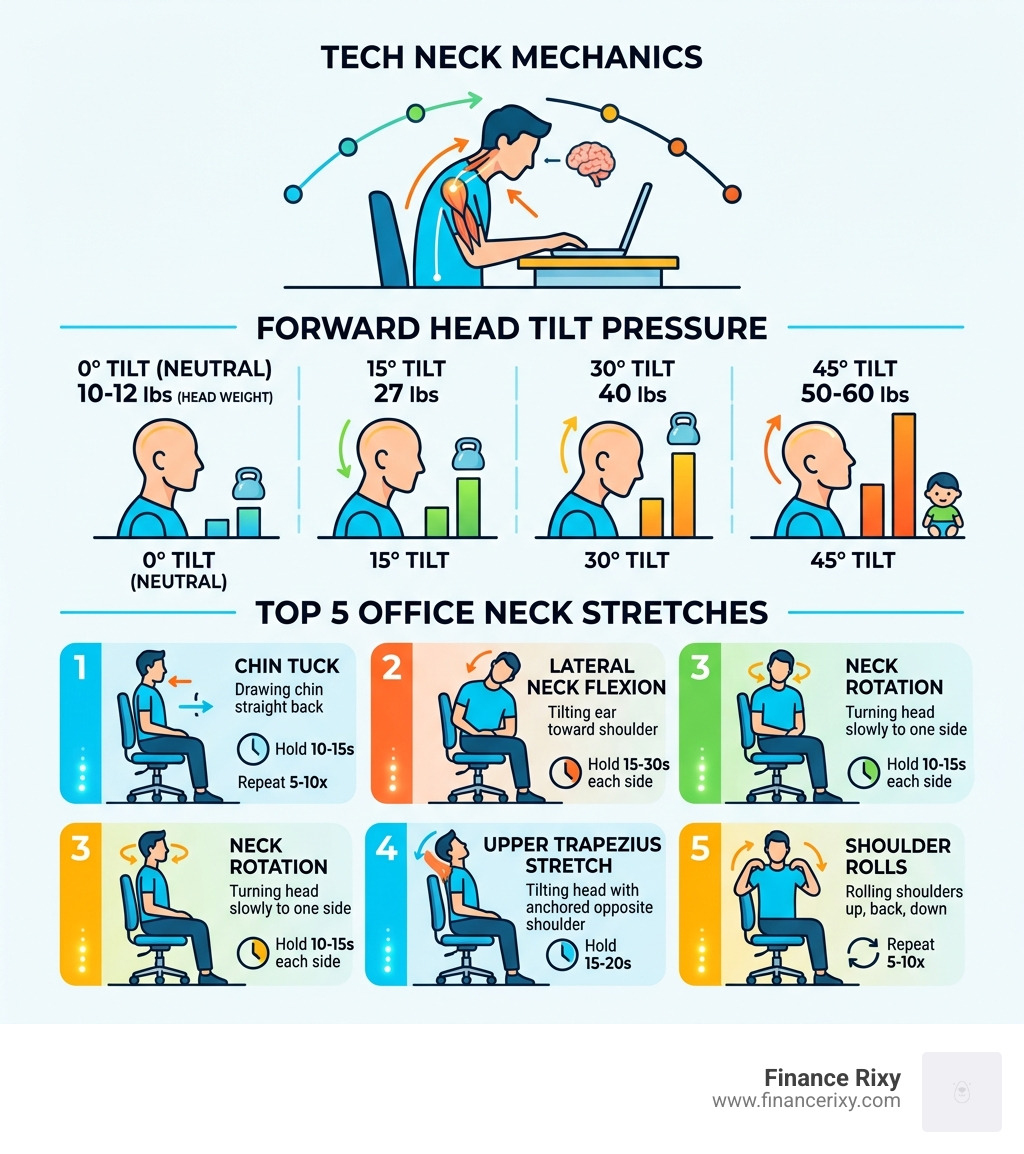
- Chin Tuck — Draw your chin straight back, hold 10-15 seconds, repeat 5-10 times
- Lateral Neck Flexion — Tilt your ear toward your shoulder, hold 15-30 seconds each side
- Neck Rotation — Turn your head slowly to one side, hold 10-15 seconds, repeat each side
- Upper Trapezius Stretch — Tilt your head while anchoring the opposite shoulder down, hold 15-20 seconds
- Shoulder Rolls — Roll shoulders up, back, and down in a slow circle, repeat 5-10 times
If you’re an office worker, chances are your neck is taking a beating every single day. Americans spend close to seven hours a day looking at screens — and your body was simply not designed to sit still that long.
Here’s a striking fact: your head weighs around 10 to 12 pounds. For every inch you tilt it forward toward a screen, the load on your neck muscles doubles. At a 45-degree tilt — the angle most of us use when checking our phones or hunching over a laptop — your neck is supporting the equivalent of 50 to 60 pounds of pressure.
That’s the weight of a small child, pressing down on your neck, all afternoon.
It’s no wonder neck pain is one of the most common complaints among desk workers. The good news? A few simple stretches, done consistently throughout your workday, can make a real difference — fast.
Why Office Workers Experience Neck and Shoulder Pain

As we move through April 2026, the trend of remote and hybrid office work continues to dominate our lives. While the flexibility is great, our bodies are paying a “sedentary tax.” We often talk about “Tech Neck” (or text neck) as if it’s just a buzzword, but it is a mechanical reality that affects over 20 different muscles running from the base of your skull to your shoulder blades and collarbones.
The primary culprit is the forward head tilt. When we hunch over a laptop or peer at a smartphone, we move our cervical spine out of its natural alignment. This creates a cycle of muscle laxity and overuse. The muscles at the front of your neck become weak and overstretched, while the muscles at the back—like the Upper Trapezius and Levator Scapulae—become chronically tight and overworked as they struggle to keep your heavy head from falling forward.
Furthermore, office environments often involve repetitive motions. Typing, clicking a mouse, and even the way we hold a phone against our shoulder can lead to repetitive stress injuries. Then there’s the psychological factor: stress. When we are under pressure to meet a deadline, we subconsciously lift our shoulders toward our ears. This “shrugging” response keeps our muscles in a state of constant tension, leading to those familiar afternoon headaches and shoulder knots.
According to The Ultimate ‘Deskercise’ Routine: Stretches for the Office – Healthline, staying in one position for too long is one of the biggest risks to our musculoskeletal health. Our bodies were built for movement, not for eight-hour blocks of stillness.
5 Essential Neck Stretches Office Workers Can Do at Their Desk
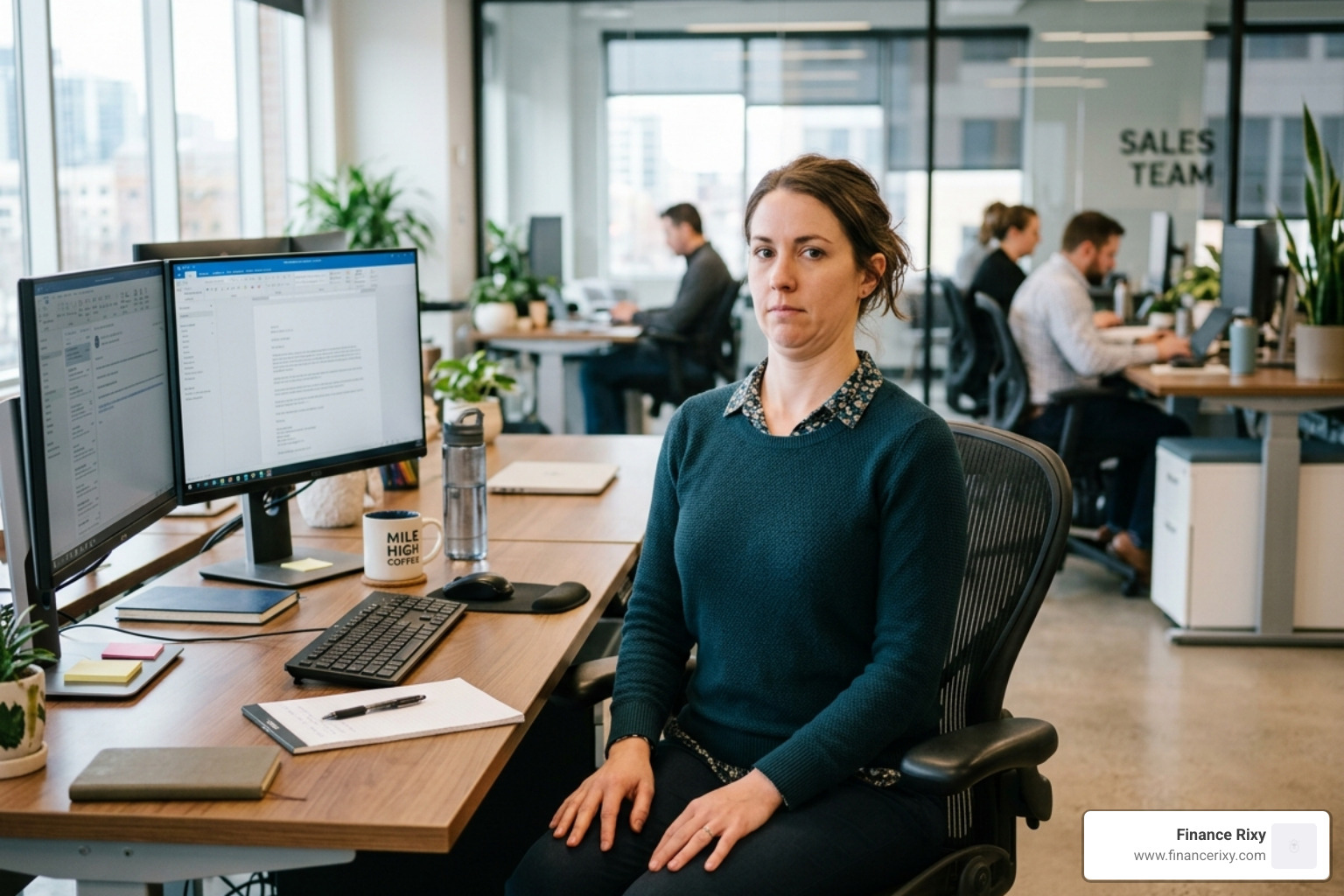
You don’t need to leave your workstation to start feeling better. In fact, some of the most effective neck stretches office employees can utilize are completely discreet. We recommend moving your chair slightly away from the desk so you don’t hit your elbows, but otherwise, these can be done right in your seat.
1. The Chin Tuck (The “Double Chin” Move)
This is arguably the most important move for reversing forward head posture. It strengthens the deep neck flexors.
- How to do it: Sit tall and look straight ahead. Without tilting your head down, gently draw your head and chin straight back, as if you’re trying to make a double chin. You should feel a stretch at the base of your skull and the back of your neck.
- Hold: 5 seconds. Repeat 10 times.
2. Lateral Neck Flexion (Ear-to-Shoulder)
This targets the sides of your neck which often tighten up when we stare at dual monitors.
- How to do it: While sitting back in your chair with your feet flat, slowly lower your right ear toward your right shoulder. Keep your shoulders down—don’t let the shoulder “cheat” by lifting up to meet the ear.
- Hold: 15-30 seconds. Switch sides.
3. Upper Trapezius Stretch
This is a deeper version of the lateral flexion that hits the large muscle connecting your neck and shoulders.
- How to do it: Perform the lateral flexion (ear to shoulder). To increase the stretch, take the hand on the side you are leaning toward and apply very gentle pressure to the top of your head. Reach your opposite arm down toward the floor or grab the seat of your chair to “anchor” that shoulder.
- Hold: 15-20 seconds. Repeat 2-3 times per side.
4. Levator Scapulae Stretch (The “Armpit Sniffer”)
If you have a “knot” in the corner where your neck meets your shoulder blade, this is for you.
- How to do it: Sit tall and turn your head 45 degrees to the right. Look down toward your right armpit. Use your right hand to gently pull your head closer to your chest.
- Hold: 15-30 seconds. Switch sides.
5. Shoulder Rolls and Shrugs
These help “reset” the resting tension of your shoulder girdle.
- How to do it: Inhale deeply as you shrug your shoulders up to your ears. Hold for 3 seconds, then exhale forcefully as you drop them down and roll them back.
- Hold: Repeat 5-10 times.
For a visual guide on these movements, you can watch this Video: Neck stretches for the workplace – Mayo Clinic to ensure your form is correct.
Stretch Comparison Table
| Stretch Name | Primary Muscle Targeted | Best For |
|---|---|---|
| Chin Tuck | Deep Neck Flexors | Reversing “Tech Neck” / Forward Head |
| Lateral Flexion | Scalenes / Sternocleidomastoid | Side-to-side mobility |
| Upper Trap Stretch | Trapezius | Relieving shoulder-top tension |
| Levator Scapulae | Levator Scapulae | Relieving knots in the shoulder blade |
| Shoulder Rolls | Trapezius / Rhomboids | General stress and tension release |
Best Practices for a Safe Stretching Routine
Stretching should never feel like a chore, and it should certainly never feel like a punishment. At Finance Rixy, we believe that “less is more” when it comes to intensity, but “more is more” when it comes to frequency.
The most important rule is to breathe. Many people unconsciously hold their breath when they feel a tight muscle. This actually triggers a stress response in the body, making the muscle tighten further. Instead, use diaphragmatic breathing—inhale through your nose, letting your belly expand, and exhale slowly through your mouth as you lean into the stretch.
Key Safety Tips:
- No Bouncing: Avoid ballistic movements. Keep your stretches slow, smooth, and controlled. Bouncing can cause small tears in the muscle fibers.
- Gentle Tension Only: You should feel a “pull” or “mild discomfort,” but never a sharp, stabbing, or electric pain. If you feel numbness or tingling in your arms or hands, stop immediately.
- Listen to Your Body: Every day is different. Some days you might be more flexible than others depending on your sleep, hydration, and stress levels.
For more tips on integrating these into a full routine, check out this Deskercise – Neck and Shoulder Stretches – YouTube video.
How to Perform a Neck Stretches Office Routine Safely
To see real results, consistency is the secret sauce. A single 10-minute stretch on a Friday won’t undo 40 hours of slouching. We recommend “The Hourly Reset.”
- Frequency: Set a timer on your computer or phone for every 60 minutes.
- Duration: Spend just 2 minutes performing two of the stretches listed above.
- Habit Stacking: Attach your stretching to an existing habit. For example, do a Chin Tuck every time you hit “Send” on an email, or do Shoulder Rolls while your coffee is brewing.
- The “Send” Stretch: Every time you finish a task, take 30 seconds to look away from the screen and do a lateral neck flexion.
Ergonomic Adjustments to Support Your Neck Health
Stretching is only half the battle. If you stretch for five minutes but then return to a poorly configured desk for seven hours, you are fighting an uphill battle. At Finance Rixy, we advocate for a holistic approach that combines movement with a smart environment.
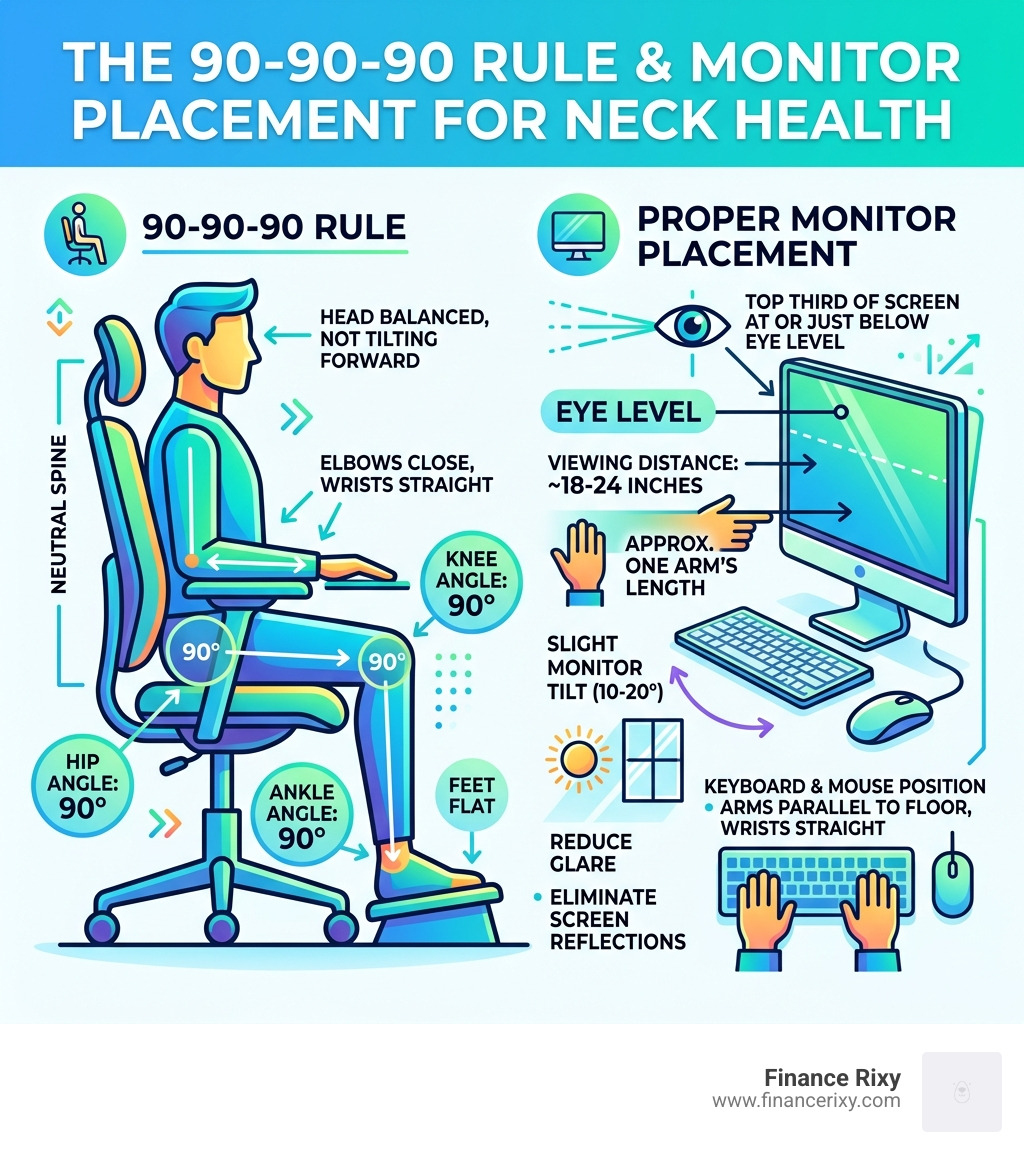
The 90-90-90 Rule
Your setup should allow your body to maintain natural 90-degree angles:
- Elbows: At 90 degrees, resting comfortably at your side (not reaching forward).
- Hips: At 90 degrees, with your back supported by the chair’s lumbar curve.
- Knees: At 90 degrees, with your feet flat on the floor. If your feet don’t reach the floor, use a footrest.
Monitor Height and Eye Level
One of the biggest causes of neck pain is a monitor that is too low. If you are looking down at a laptop, your neck is under constant strain.
- The Rule: The top third of your screen should be at eye level.
- The Fix: Use a laptop stand or even a stack of sturdy books to raise your screen. If you use dual monitors, ensure they are at the same height and angled slightly toward you to minimize extreme neck rotation.
The 20-20-20 Rule for Eye and Neck Strain
Eye strain and neck pain are closely linked. When our eyes get tired, we tend to lean closer to the screen to see better, which ruins our posture.
- Every 20 minutes: Look at something 20 feet away for at least 20 seconds. This allows your eye muscles to relax and encourages you to sit back and reset your spine.
Additional Tools
- Ergonomic Mouse: Reduces the need to “hover” your hand, which can cause tension to travel up to your shoulder and neck.
- Standing Desks: These are excellent because they allow you to change positions frequently. However, standing with poor posture is just as bad as sitting with poor posture. Keep your weight evenly distributed.
Conclusion
At Finance Rixy, we know that your work is important, but your physical well-being is the foundation of your productivity. By incorporating a neck stretches office routine and making small ergonomic adjustments, you aren’t just treating pain—you’re investing in your long-term health.
These habits are “buildable.” Start small. Choose one stretch to do today. Tomorrow, try two. Over time, these micro-breaks will become a natural part of your workday, leaving you with more energy and less stiffness by the time 5:00 PM rolls around.
For more information on improving your daily health, check out More wellness tips and posture guides.
Frequently Asked Questions about Neck Stretches Office
How often should I stretch my neck during the workday? Ideally, you should move or stretch every hour. Even a 30-second “micro-break” can prevent muscles from locking into a shortened position.
Can these stretches help with tension headaches? Yes. Many “office headaches” are actually tension-type headaches caused by tight muscles at the base of the skull (the suboccipitals). The Chin Tuck and Upper Trapezius stretch are particularly effective at relieving this pressure.
Is it normal to hear “cracking” sounds? Mild clicking or “painless popping” (crepitus) is generally normal as long as it isn’t accompanied by pain. It is often just gas bubbles moving in the joint fluid. However, if the cracking is painful, stop and consult a professional.
When to Seek Professional Help for Neck Pain
While most desk-related stiffness can be managed with stretching and ergonomics, some symptoms require medical attention. Please consult a healthcare provider or physical therapist if you experience:
- Sharp or Radiating Pain: Pain that shoots down your arm or into your hand.
- Numbness or Tingling: A “pins and needles” sensation in your extremities.
- Weakness: Difficulty gripping objects or lifting your arm.
- Severe Symptoms: If neck stiffness is accompanied by a high fever, nausea, or extreme sensitivity to light, seek emergency care immediately, as these can be signs of more serious conditions.
- No Improvement: If your pain persists for more than 2-3 weeks despite regular stretching and ergonomic changes.
A physical therapist can provide personalized guidance and strengthening exercises tailored to your specific anatomy, ensuring you stay pain-free in the long run.
