
Say Goodbye to Back Pain While Working at Your Computer
Back Pain from Computer Work Is More Common Than You Think
Back pain computer work is one of the most widespread health problems facing desk workers today. If you’re looking for fast answers, here’s what actually helps:
Quick answers for back pain from computer work:
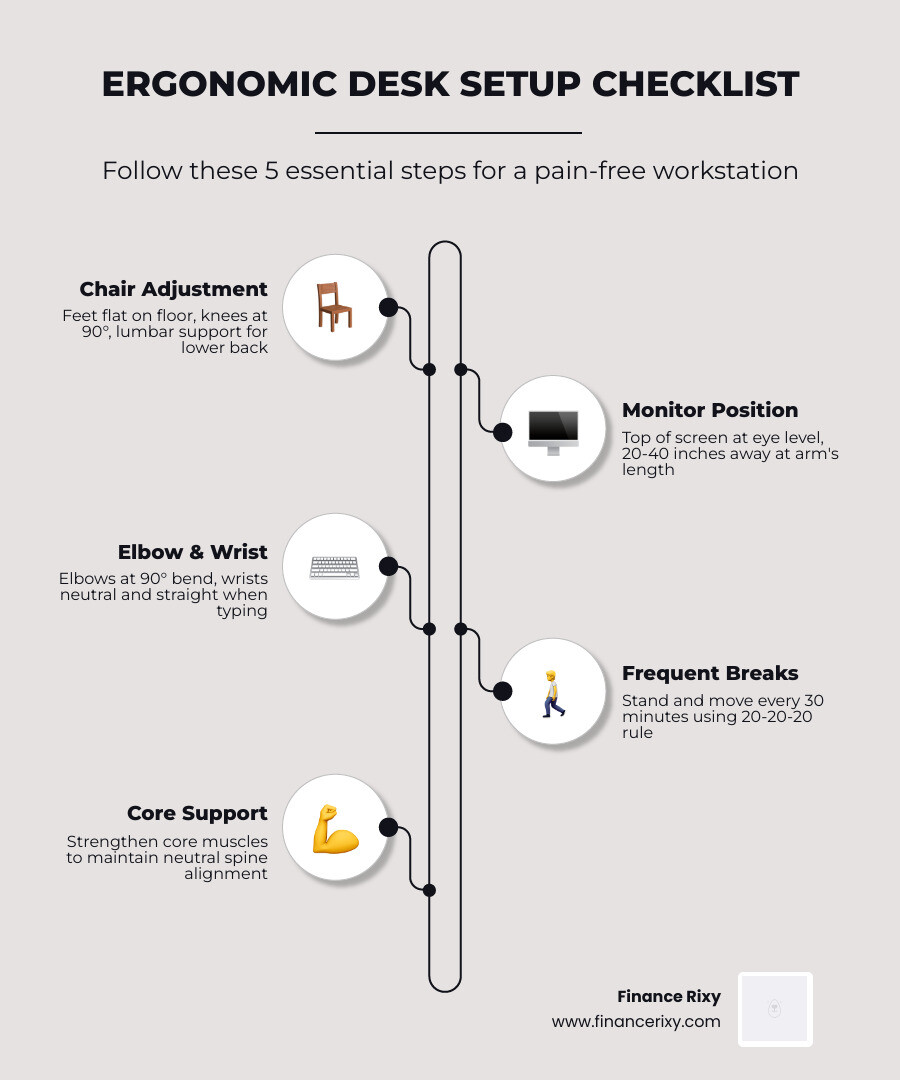
- Adjust your chair so your feet are flat, knees at 90°, and lower back supported
- Position your monitor at arm’s length with the top of the screen at eye level
- Get up every 30 minutes — even a short walk or stretch makes a real difference
- Keep elbows at 90° with wrists neutral when typing
- Strengthen your core to support your spine throughout the day
The numbers are hard to ignore. Studies show that between 23% and 38% of desk workers deal with back pain in any given year. For people working from home, that number climbs to over 41%. And for anyone sitting at a computer for more than four hours a day? More than 80% report back pain.
That’s not a coincidence — it’s a posture and movement problem.
Prolonged sitting puts serious pressure on your spinal discs, tightens your hip flexors, and weakens the muscles that keep you upright. Most people don’t realize how much damage a poorly set-up workstation can do over months and years.
The good news: most back pain from computer work is preventable. The right setup, regular movement, and a few simple habits can make a dramatic difference — without needing to overhaul your entire life.
Why Back Pain Computer Work is a Growing Epidemic in April 2026
As we move through 2026, the shift toward hybrid and permanent remote work has solidified. While the commute might be shorter, our spinal health is paying the price. We are seeing a massive spike in what experts call “sedentary behavior diseases,” and back pain computer work is at the forefront.
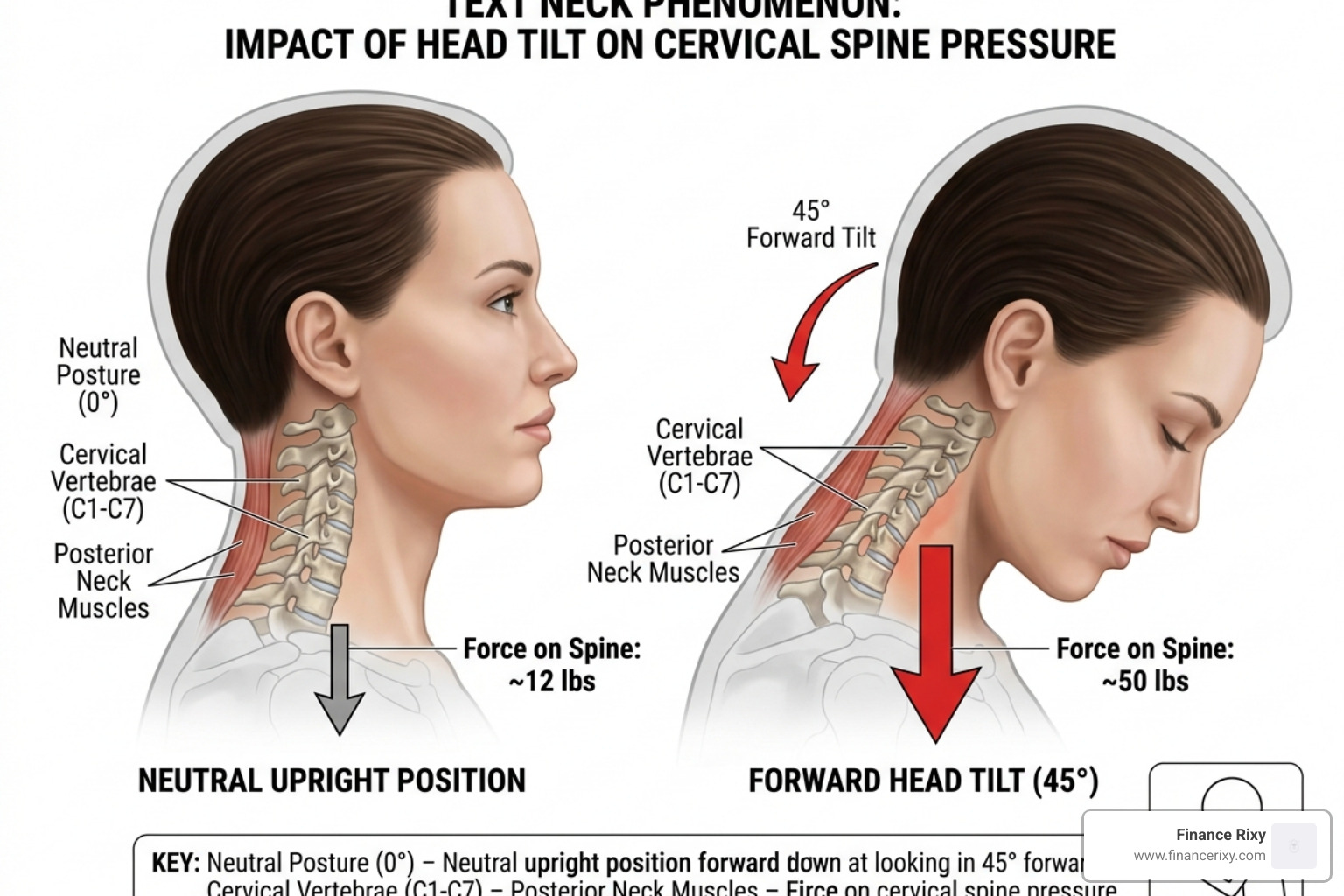
The physics of sitting are brutal on the human frame. Consider this: the average human head weighs about 12 pounds—roughly the weight of a bowling ball. When you hunch forward at a 45-degree angle to look at a laptop or document, that “bowling ball” exerts nearly 50 pounds of force on your neck and upper back. Over an eight-hour workday, that’s a recipe for disaster.
According to research from UCLA Health, sitting for long periods in a slouched position overstretches spinal ligaments and strains the intervertebral discs. This leads to:
- Disc Compression: Constant pressure can cause the soft centers of your spinal discs to bulge or even herniate.
- Muscle Atrophy: When we sit, our glutes and core muscles essentially “switch off,” leaving the spine without its natural muscular corset.
- Contact Stress: This occurs when hard desk edges press against your wrists or thighs, restricting blood flow and irritating nerves.
The statistics are startling. It is estimated that 40 percent of people currently suffering from back pain have spent long hours at their computer each day. Whether you are in a corporate office or a home setup, the lack of movement is the primary enemy of a healthy spine.
Top Ergonomic Solutions for a Pain-Free Workstation
At Finance Rixy, we believe that your environment dictates your health. You don’t necessarily need the most expensive gear, but you do need a setup that respects your body’s mechanics. Mayo Clinic suggests that the goal of ergonomics is to make the technology accommodate the person, rather than forcing the person to accommodate the technology.
| Feature | Standing Desk | Ergonomic Chair |
|---|---|---|
| Primary Benefit | Encourages movement & calorie burn | Provides consistent spinal support |
| Best For | Active workers, core engagement | Focused tasks, long endurance |
| Key Requirement | Supportive footwear & anti-fatigue mat | Adjustable lumbar & armrests |
| Posture Goal | Neutral spine, weight shifting | 115-120 degree torso angle |
To achieve a “neutral spine,” your chair should support the natural curves of your back. We recommend adjusting your seat so there is a slight incline—roughly 115 to 120 degrees between your torso and thighs. This opens up the hip flexors and reduces the “pull” on the lower back.
Ergonomic Adjustments for Back Pain Computer Work
Setting up your desk shouldn’t be guesswork. Follow this checklist to align your body correctly:
- Monitor Height: The top of your screen should be at or slightly below eye level. If you wear bifocals, lower the monitor by another 1 to 2 inches to avoid tilting your head back.
- The Arm’s Length Rule: Your monitor should be about 20 to 40 inches away. If you find yourself leaning forward to read, increase the font size rather than moving your body.
- The 90-Degree Rule: Your elbows should be bent at 90 degrees, with your forearms parallel to the floor. Your wrists should stay neutral—not cocked up or down.
- Foot Placement: Your feet must be flat on the floor. If your chair is too high for your desk and your feet dangle, use a footrest or a sturdy box.
- Clearance: Ensure there is a 2-3 inch gap between the back of your knees and the edge of the seat pan to maintain circulation.
The Pros and Cons of Standing Desks
Standing desks have become the “gold standard” for many in 2026, but they aren’t a magic wand. If you stand perfectly still for eight hours, you’ll simply trade back pain for foot and knee pain.
The Pros:
- Reduces the risk of obesity and metabolic issues.
- Makes it easier to transition into movement or stretching.
- Engages the glutes and core muscles.
The Cons:
- Can lead to varicose veins or joint strain if used without breaks.
- Requires a transition period; your body isn’t used to standing all day.
Pro-Tip: If you use a standing desk, wear supportive shoes. Walking on a hard floor in socks or flat slippers while working can send shockwaves up your legs and into your lower back. Shift your weight frequently and consider an anti-fatigue mat to keep your leg muscles micro-moving.
Daily Movement and Stretches to Relieve Tension
Even the most expensive ergonomic chair in the world won’t save you if you sit still for four hours straight. Movement is medicine for the spine.

We advocate for the 20-20-20 rule: Every 20 minutes, look at something 20 feet away for 20 seconds. This helps with eye strain, which indirectly helps back pain computer work because eye fatigue often causes us to lean forward and ruin our posture.
The AAOS recommends several “deskercises” you can do without even leaving your seat:
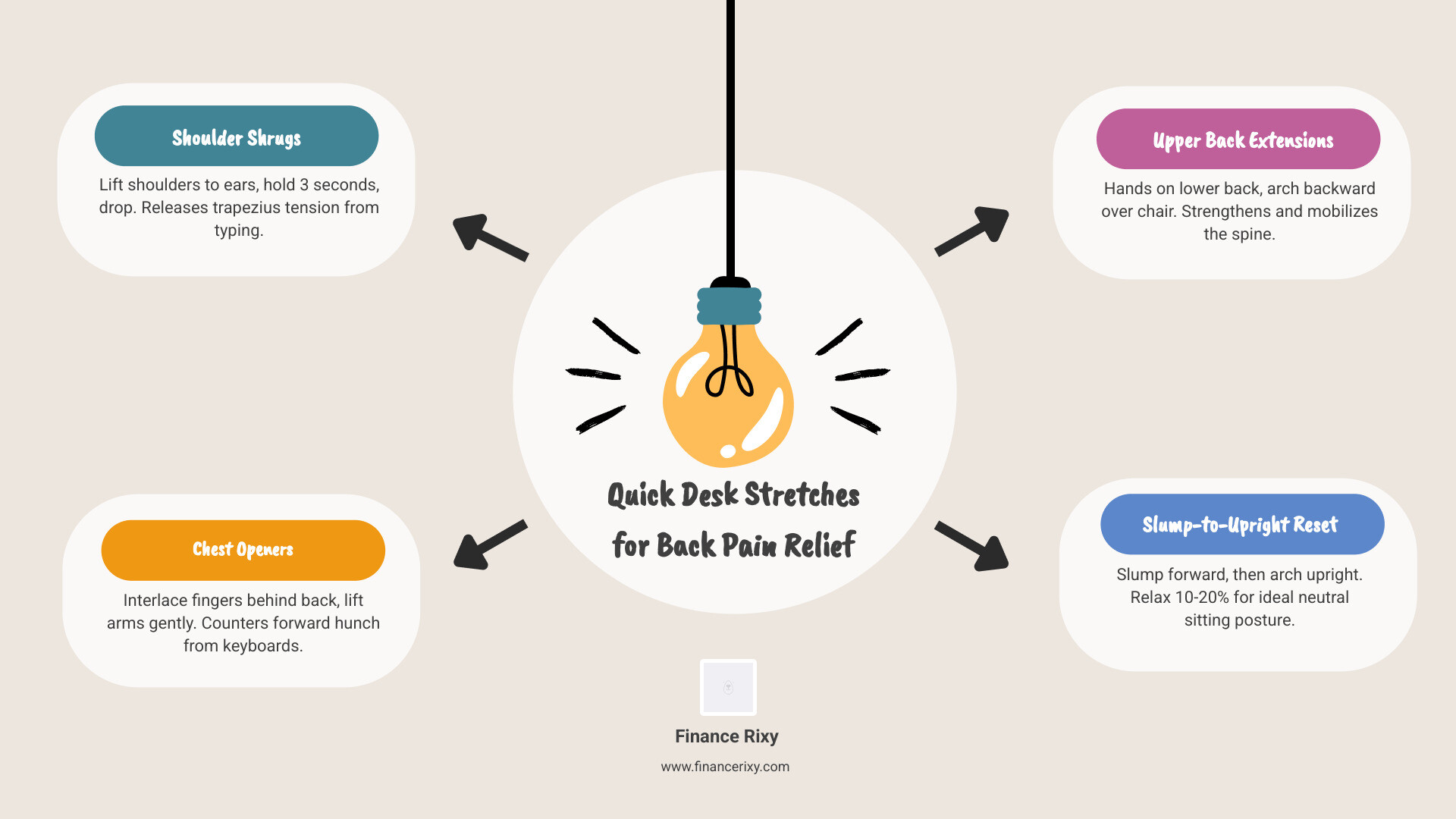
- Shoulder Shrugs: Lift your shoulders to your ears, hold for three seconds, and drop them. This releases the “traps” which hold tension from typing.
- Chest Openers: Interlace your fingers behind your back and gently lift your arms. This counters the “hunch” we all get from using a keyboard.
- Upper Back Extensions: While sitting, place your hands on your lower back and gently arch backward over the top of your chair.
- The Slump-to-Upright Reset: Slump forward completely, then pull yourself into an extreme upright arch. Relax that position by about 10-20%, and that is your “neutral” sitting posture.
Holistic Lifestyle Tips for Spinal Longevity
Preventing back pain computer work doesn’t stop when you log off. Your habits at home dictate how resilient your spine is during the workday. According to Harvard Health, managing chronic pain requires a “multidisciplinary approach.”
Diet and Hydration: Believe it or not, what you eat affects your back. An anti-inflammatory diet rich in Omega-3 fatty acids (found in salmon, walnuts, and flaxseeds) can help reduce the inflammation that causes “flare-ups.” Staying hydrated is also vital; your spinal discs are largely made of water, and dehydration can make them less effective at absorbing shock.
The Hidden Danger of Nicotine: Research shows that nicotine actually accelerates the degeneration of intervertebral discs. It restricts blood flow to the spine, meaning your discs don’t get the nutrients they need to stay healthy. If you’re looking for a reason to quit, your back will thank you.
Sleep Hygiene: Your pillow height matters. A pillow that is too high or too firm can strain your neck all night, making it impossible to maintain good posture the next day. Ensure your mattress provides enough support to keep your spine in a straight line while you sleep.
When to See a Specialist for Back Pain Computer Work
While most back pain is “mechanical” and resolves with movement and ergonomics, some symptoms require professional intervention. You should seek help if you experience:
- Numbness or tingling that radiates down your legs (sciatica).
- Pain that prevents you from sleeping.
- Weakness in your legs or difficulty walking.
- Pain that hasn’t improved after 4-6 weeks of ergonomic changes.
A physical therapist can help you re-engage your “deep core” muscles—the transversus abdominis and multifidus—which act as your body’s internal back brace.
Frequently Asked Questions about Back Pain Computer Work
Why does my lower back hurt only when I sit at my desk?
This is usually due to “postural strain.” When you sit, your hip flexors shorten and pull on your pelvis, which in turn pulls on your lower back. If your chair lacks lumbar support, your lower spine loses its natural inward curve, putting immense pressure on the discs.
Can a standing desk actually make my back pain worse?
Yes, if used incorrectly. If you “lock” your knees or lean on one hip while standing, you are creating new imbalances. The key is to switch between sitting and standing every 30 to 60 minutes.
How often should I realistically get up from my computer?
At Finance Rixy, we recommend a “micro-break” every 30 minutes. This doesn’t mean a 15-minute coffee break; it means standing up, reaching for the ceiling, and taking three deep breaths. This “resets” your nervous system and prevents muscles from locking into a static position.
Conclusion
Conquering back pain computer work isn’t about buying one fancy gadget; it’s about a commitment to your physical well-being. By aligning your workstation, moving your body every half hour, and supporting your spine with a strong core and healthy lifestyle, you can work effectively without the constant shadow of discomfort.
Your body was designed to move, not to be a statue in front of a glowing screen. Small changes today—like raising your monitor or taking a quick walk—will pay dividends for your spinal health for decades to come.
Improve your physical well-being with wellness tips from Finance Rixy
