
How to survive the 9-to-5 without chronic back pain
The Quiet Epidemic: What Office Worker Back Pain Is Doing to Millions of Us
Office worker back pain is one of the most common — and most underestimated — health problems in the modern workplace.
Here’s a quick snapshot of what you need to know:
- What it is: Pain, stiffness, or discomfort in the lower, mid, or upper back caused by prolonged sitting, poor posture, and limited movement
- Who it affects: Between 40% and 70% of office workers experience some form of neck or back pain every year
- Why it happens: Sustained static posture, weak core muscles, poor workstation setup, and reduced movement variety
- What helps: Regular movement breaks, ergonomic adjustments, and combining physical activity with ergonomic improvements
- When to act: Start now — small daily habits make the biggest long-term difference
As of April 2026, back pain remains one of the leading causes of years lived with disability worldwide. The global point prevalence of low-back pain sits at 7.0%, meaning over half a billion people are dealing with it right now.
And desk workers are disproportionately affected.
Studies show that 23% to 38% of desk workers experience back pain in any given year. For those working from home, that number climbs even higher — one study found 41.2% of home-based workers reported low back pain.
The economic toll is just as striking. Back problems drive enormous healthcare costs and lost productivity. Estimates put the cost of back pain at $100–$200 billion per year in the United States alone, mostly from lost work output.
Here’s the uncomfortable truth: it’s not that office work is hard on the body because it’s demanding — it’s hard because it’s monotonous. Employees aren’t doing harder work than previous generations. They’re doing less varied work. The body isn’t built to hold one position for hours at a time, no matter how “good” that position is.
The good news? Most cases of office-related back pain are preventable — and even reversible — with the right daily habits.
The Science Behind Office Worker Back Pain
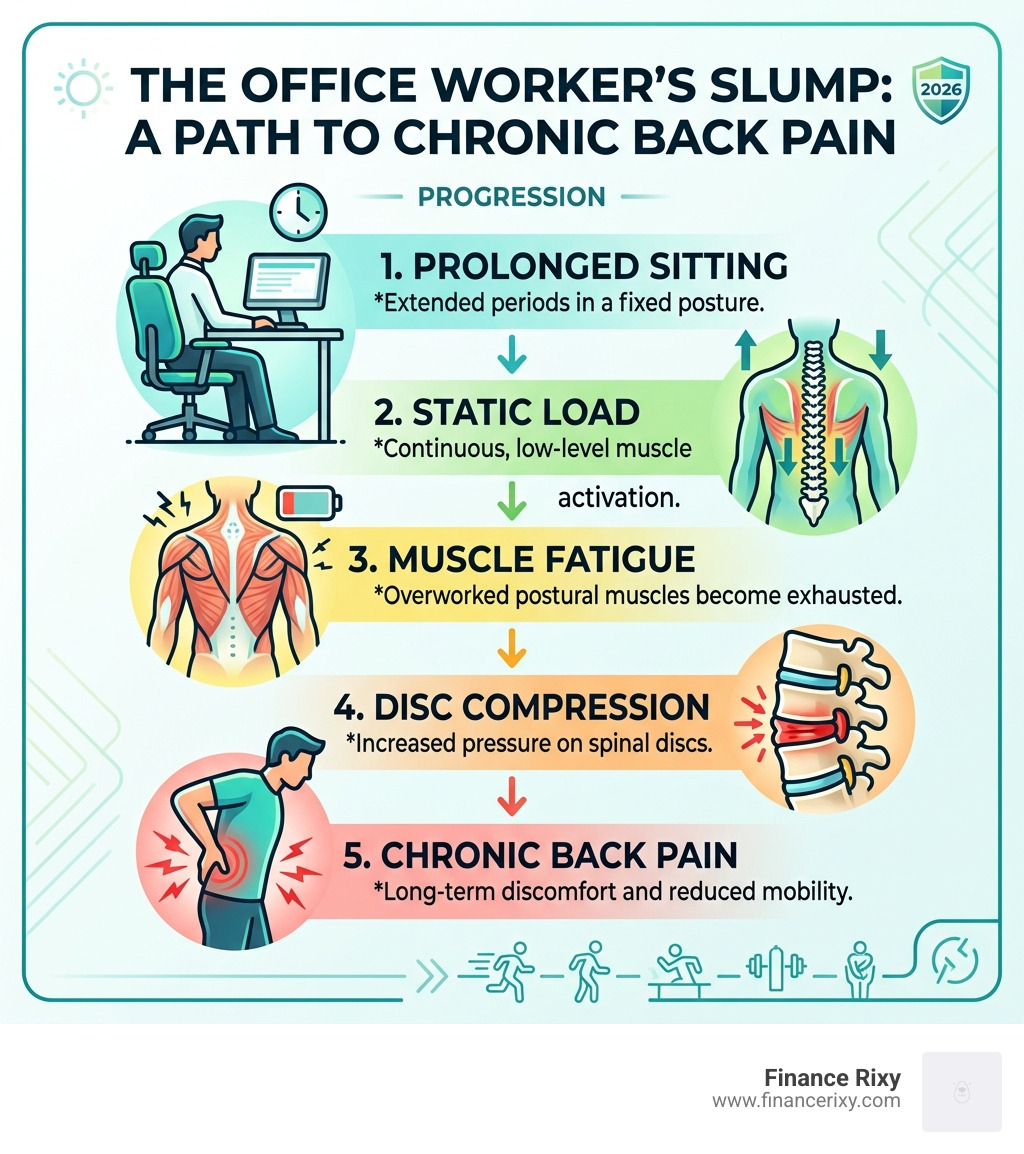
To fix the problem, we first need to understand what’s happening under the hood. When we sit at a desk, we aren’t just “resting.” We are subjecting our bodies to a static load. Unlike walking or lifting, where muscles contract and relax in a cycle, sitting involves continuous, low-level muscle activation.
Over time, this leads to muscle fatigue. Think of it like holding a light weight with an outstretched arm. It’s easy for ten seconds, but after ten minutes, your shoulder is screaming. This is essentially what happens to your postural muscles during a long shift.
The Mechanics of Compression and Dehydration
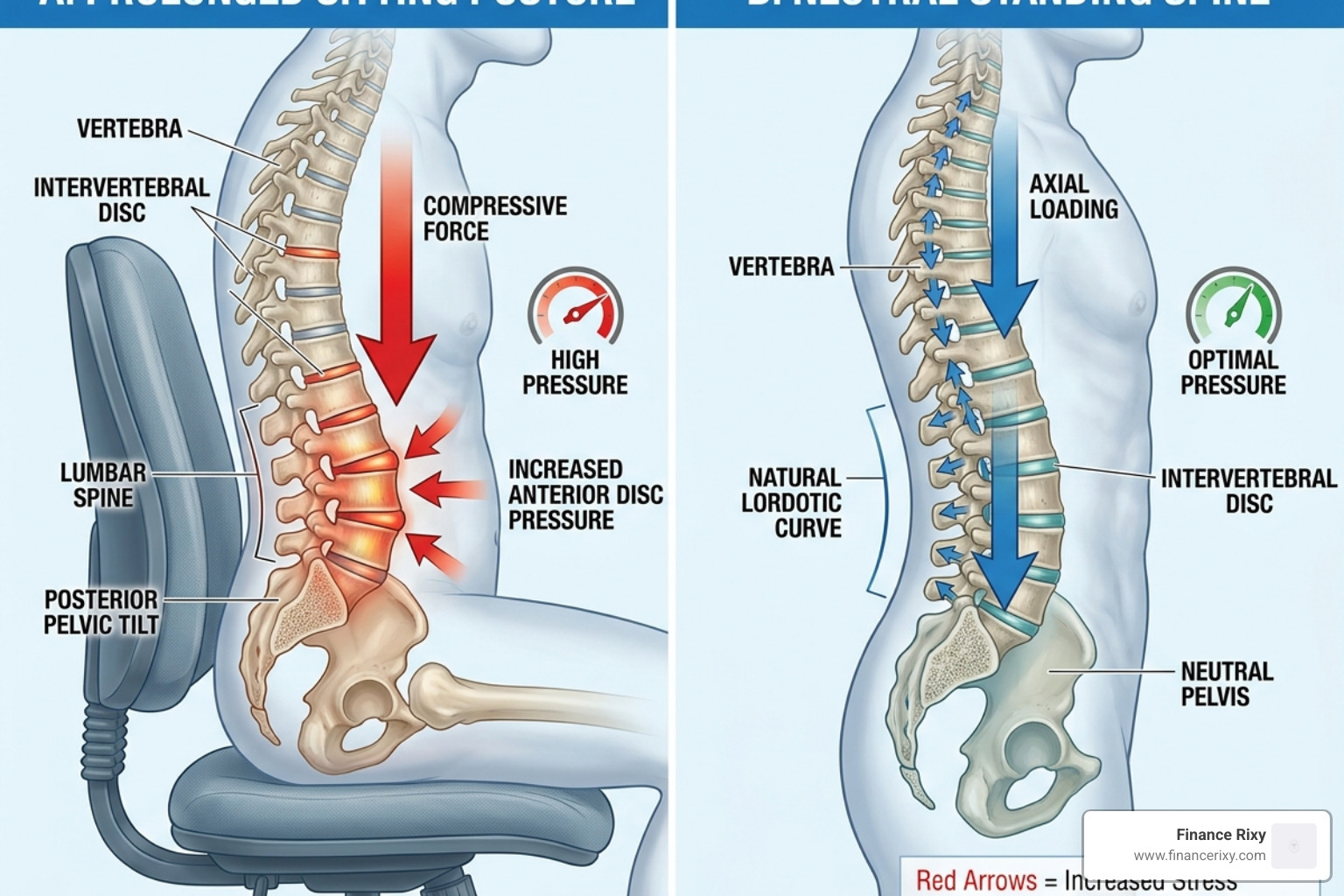
Our spinal discs are the shock absorbers of the back, and they are largely made of water. In a standing position, the load is distributed evenly. However, when we slump into the “Office Worker’s Slump,” we increase the pressure on these discs. Because the spine is curved and the core is inactive, the discs are squeezed, pushing fluid out.
Without movement to “pump” nutrients and fluid back into the discs, they become slightly dehydrated and brittle throughout the day. This is Why Office Workers Develop Back Pain — it’s a cumulative load that peaks in the late afternoon.
Gluteal Amnesia and Cognitive Stress
Have you heard of “dead butt syndrome”? In the medical world, it’s called gluteal amnesia. When we sit on our glutes for eight hours, the nerves that fire those muscles essentially go to sleep. This forces the lower back muscles to take over the job of stabilizing the torso, leading to that familiar dull ache.
Furthermore, our brains play a role. High cognitive stress — like a looming deadline or a difficult email — causes us to hold our breath and tense our shoulders. Vision strain from staring at small fonts also makes us lean forward, further compressing the spine. It’s a perfect storm of physical and mental factors.
Why Prolonged Sitting Triggers Office Worker Back Pain
The primary issue isn’t just the chair; it’s the lack of circulation. Static posture reduces blood flow to the soft tissues. When blood doesn’t flow, muscles don’t get oxygen, and metabolic waste products (like lactic acid) build up, causing that “heavy” feeling in your limbs.
| Feature | Static Sitting | Dynamic Sitting |
|---|---|---|
| Muscle Activity | Continuous low-level tension | Intermittent contraction/relaxation |
| Disc Health | Fluid is squeezed out | “Pump” effect rehydrates discs |
| Circulation | Restricted | Enhanced |
| Fatigue Level | High (cumulative) | Low (managed) |
The Impact of Work-from-Home Environments
The shift to remote work has complicated the office worker back pain landscape. Many of us traded ergonomic office chairs for kitchen stools or, worse, the couch. Research shows that home-based workers have a 41.2% prevalence of low back pain, largely due to “continuous work.”
In a traditional office, you walk to meetings or the breakroom. At home, work often becomes a single, uninterrupted block. This lack of “incidental movement” means our bodies never get a recovery cycle.
The Ergonomic Audit: Setting Up Your Workspace
We believe that your environment should support your body, not fight it. A proper ergonomic audit is the first step toward a pain-free life. It’s about more than just buying an expensive chair; it’s about how you fit into it.
The 90-Degree Rule and Chair Setup
Your chair is your primary tool. Here is how to dial it in:
- Seat Height: Adjust your chair so your feet are flat on the floor. Your knees should be at a 90-degree angle, level with or slightly below your hips.
- Lumbar Support: Your chair should follow the natural curve of your lower spine. If there’s a gap between your back and the chair, use a lumbar roll or even a rolled-up towel.
- The Recline: Believe it or not, sitting at a perfectly vertical 90-degree angle is actually harder on your discs. Aim for a slight recline of 100 to 110 degrees to shift some of the weight to the chair’s backrest.
- Armrests: Adjust them so your shoulders are relaxed and your elbows stay close to your body at a 90-degree angle.
For more detailed guidance, check out these Ergonomic and Proper Posture for Sitting – Spine Care | UCLA Health tips.
Optimizing Your Digital Horizon to Prevent Office Worker Back Pain
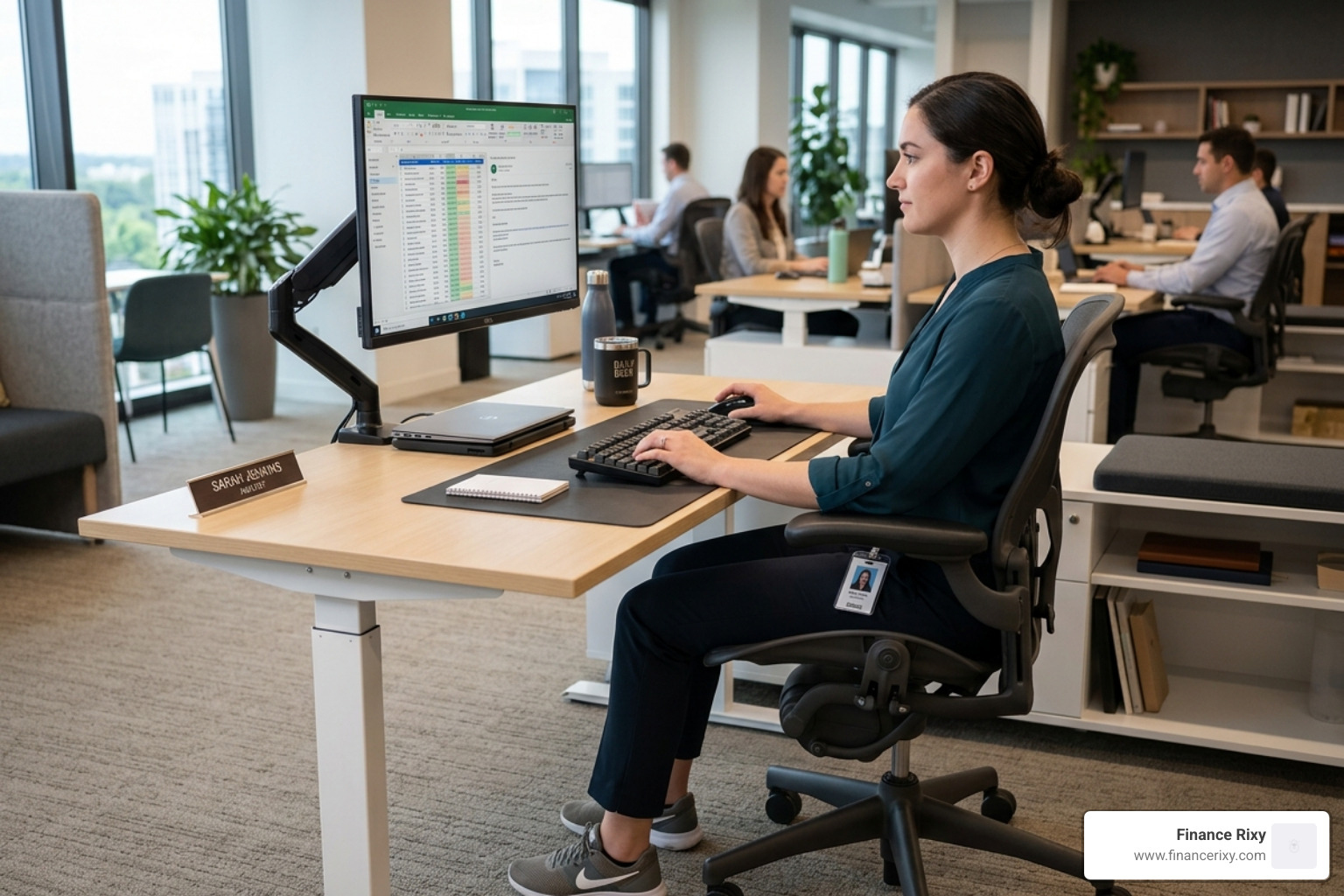
Your “digital horizon” is where your eyes naturally land. If your monitor is too low, you’ll develop “tech neck.”
- Eye Level: The top third of your screen should be at eye level.
- Distance: Keep the screen about 20 to 40 inches (an arm’s length) away.
- Bifocal Users: If you wear bifocals, lower the monitor by an extra 1 to 2 inches to avoid tilting your head back to see through the bottom of your lenses.
- Peripherals: Keep your mouse and keyboard close enough that you don’t have to reach. Reaching creates “contact stress” on your wrists and pulls your shoulders out of alignment.
The Role of Standing Desks and Sit-Stand Transitions
Standing desks are a fantastic tool, but they aren’t a magic wand. Standing still for eight hours is just as bad as sitting still. The goal is sustainable variation.
We recommend a 45:15 ratio: sit for 45 minutes, then stand for 15. While standing, remember to engage your glutes and shift your weight from foot to foot. If you don’t want to buy a whole new desk, standing desk converters are an excellent, budget-friendly alternative.
Evidence-Based Interventions and Movement Snacks
What does the science say about fixing office worker back pain? A 2022 systematic review of 24 studies involving over 7,000 workers found that while many interventions have minor effects, physical activity is the most consistent winner.
Physical activity probably reduces work absence by about 1.1 days per year. When you combine exercise with ergonomics, the reduction in pain intensity becomes even more significant.
The “Anti-Sitting” Mobility Routine
We call these “movement snacks.” You don’t need a gym; you just need three minutes every hour.
- Seated Figure-Four: Cross one ankle over the opposite knee and lean forward slightly. This stretches the piriformis (a common culprit in sciatica). Hold for 30 seconds.
- Thoracic Rotation: While seated, hold the back of your chair and gently twist your torso. This “wrings out” the tension in your mid-back.
- Shoulder Blade Squeezes: Imagine trying to hold a pencil between your shoulder blades. Squeeze for 5 seconds, repeat 10 times.
- Desk Hip Flexor Stretch: Stand up, put one foot back in a lunge, and tuck your pelvis. This opens up the hips that have been shortened by sitting.
Implementing Simple Strategies to Prevent Office Worker Back Pain
The hardest part of ergonomics is remembering to do it. We suggest using behavioral triggers:
- Hourly Timers: Set a “stand up” alarm on your phone or watch.
- Hydration Triggers: Drink 8–10 oz of water every hour. This keeps your discs hydrated and forces you to get up for refills and bathroom breaks.
- Walking Meetings: If you’re on a phone call that doesn’t require a screen, walk around the room.
- Pursed-Lip Breathing: When stress hits, breathe in through your nose and out through pursed lips. This calms the nervous system and reduces involuntary muscle tension.
Beyond the Desk: Strengthening and Lifestyle Factors
Stretching provides temporary relief, but strengthening provides the permanent cure. If your muscles are strong enough to support your spine, you won’t collapse into a slump when you get tired.
Strengthening the Posterior Chain
Your “posterior chain” includes your back, glutes, and hamstrings. These are the “anti-sitting” muscles.
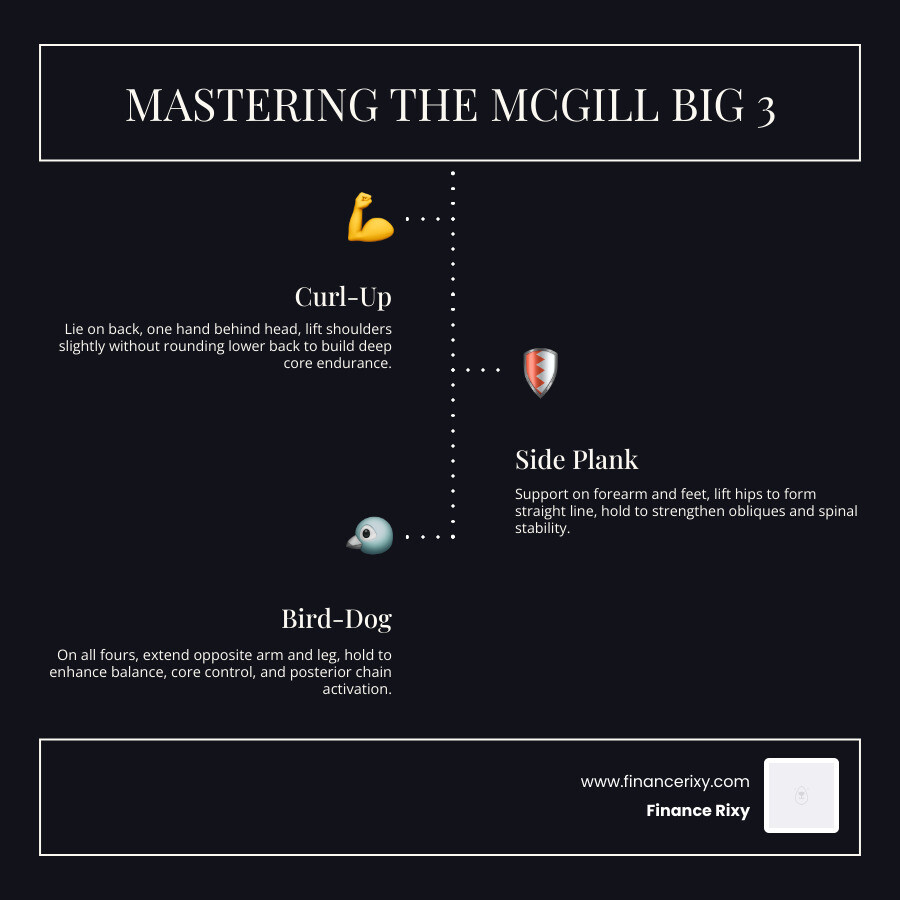
- The McGill Big 3: Developed by spine expert Dr. Stuart McGill, these exercises (the Curl-Up, Side Plank, and Bird-Dog) are the gold standard for core stability.
- Glute Bridges: Lie on your back and lift your hips. This “wakes up” the glutes after a day of sitting.
- Pilates and Yoga: These disciplines focus on functional movement and body awareness, which are crucial for maintaining posture under pressure.
Lifestyle Factors: Hydration and Sleep
Spinal health doesn’t end at 5:00 PM.
- Spinal Rehydration: Because your discs rehydrate at night, your sleep posture matters. Ensure your pillow supports the natural curve of your neck.
- The Commute Factor: Driving is often just “stressed sitting.” Use a lumbar support in your car to prevent undoing all the good work you did at the office.
- Hydration Goals: Aim for 80–100 oz of water daily. Brittle, dehydrated discs are much more prone to injury.
Frequently Asked Questions about Back Pain
How often should I take breaks from sitting?
The general consensus among therapists is the 30-minute rule. You should change your position or stand up every 30 minutes. Even a 30-second “micro-break” to stretch your arms and reset your posture can improve circulation and reduce muscle fatigue.
Can a posture corrector belt help my back?
Posture belts can be useful as feedback tools. They remind you when you are slouching. However, they should not be worn all day, as your muscles might become dependent on them. Use them for 30–60 minutes during your most fatiguing part of the day, then transition away as your core strength improves.
When should I see a professional for back pain?
While most office worker back pain resolves within 30 days with movement, you should seek immediate help if you experience “red flag” symptoms:
- Numbness or tingling in the legs
- Loss of bladder or bowel control
- Pain that wakes you up at night
- Difficulty standing straight or walking
Conclusion
At Finance Rixy, we believe that a productive career shouldn’t come at the cost of your physical health. Office worker back pain is a signal from your body that it needs variety and movement.
By conducting a simple ergonomic audit, integrating “movement snacks” into your hour, and focusing on strengthening your core, you can break the cycle of chronic pain. It isn’t about having “perfect” posture for eight hours; it’s about avoiding static positions and managing your body’s exposure to load.
Consistency is the secret ingredient. Small daily changes — like drinking more water or adjusting your monitor height — compound over time into a lifetime of spinal health.
Start your wellness journey today and take control of your workspace. Your back will thank you.
